复制niuguwen框架中的login.html代码
<!DOCTYPE html>
<html>
<head>
<meta charset="UTF-8">
<link rel="stylesheet" type="text/css" href="http://www.niuguwen.com/plugin/niuguwen/css/niuguwen.css">
<title>用户登录</title>
</head>
<body>
<div class="ngwlogin">
    <div class="formtitle">
        <a href="/">可视化拖拽式建站系统</a>
    </div>
    <div class="ngwform formbody">
        <form class="form" action="http://www.niuguwen.com/index.php?jianzhan-ucenter-login-checklogin" method="post">
            <div>
                <label>用户名</label>
                <input type="text" name="username" placeholder="请输入用户名(学号或手机号)" required="required" class="input" value="" />
            </div>
            <div>
                <label>密码</label>
                <input type="password" name="password" placeholder="请输入密码" required="required" class="input" value="" />
            </div>
            <ul>
                <li class="fl"><button type="submit">登录</button></li>
                <li class="fr">
                    <a href="/register.html">注册</a>
                </li>
            </ul>
        </form>
    </div>
    <div class="formfoot"></div>
</div>
</body>
</html>
修改几个地方
1、修改css文件位置
<link rel="stylesheet" type="text/css" href="http://www.niuguwen.com/plugin/niuguwen/css/niuguwen.css">
改为
<link rel="stylesheet" type="text/css" href="/plugin/niuguwen/css/niuguwen.css">
上方需要联网的情况下才能正常访问
2、修改表单提交
<form class="form" action="http://www.niuguwen.com/index.php?jianzhan-ucenter-login-checklogin" method="post">
改为
<form class="form" action="data/login.jsp" method="post">
3、网页顶部加入JSP文件编码,防止乱码
<%@ page contentType="text/html; charset=utf-8" language="java" import="java.sql.*" errorPage="" %>
4、修改注册 链接
<a href="/register.html">注册</a>
改为
<a href="/register.jsp">注册</a>
最终代码
<%@ page contentType="text/html; charset=utf-8" language="java" import="java.sql.*" errorPage="" %>
<!DOCTYPE html>
<html>
<head>
<meta charset="UTF-8">
<link rel="stylesheet" type="text/css" href="/plugin/niuguwen/css/niuguwen.css">
<title>用户登录</title>
</head>
<body>
<div class="ngwlogin">
    <div class="formtitle">
        <a href="/">牛骨文万能系统</a>
    </div>
    <div class="ngwform formbody">
        <form class="form" action="data/checklogin.jsp" method="post">
            <div>
                <label>用户名</label>
                <input type="text" name="username" placeholder="请输入用户名(学号或手机号)" required="required" class="input" value="" />
            </div>
            <div>
                <label>密码</label>
                <input type="password" name="password" placeholder="请输入密码" required="required" class="input" value="" />
            </div>
            <ul>
                <li class="fl"><button type="submit">登录</button></li>
                <li class="fr">
                    <a href="/register.jsp">注册</a>
                </li>
            </ul>
        </form>
    </div>
    <div class="formfoot"></div>
</div>
</body>
</html>
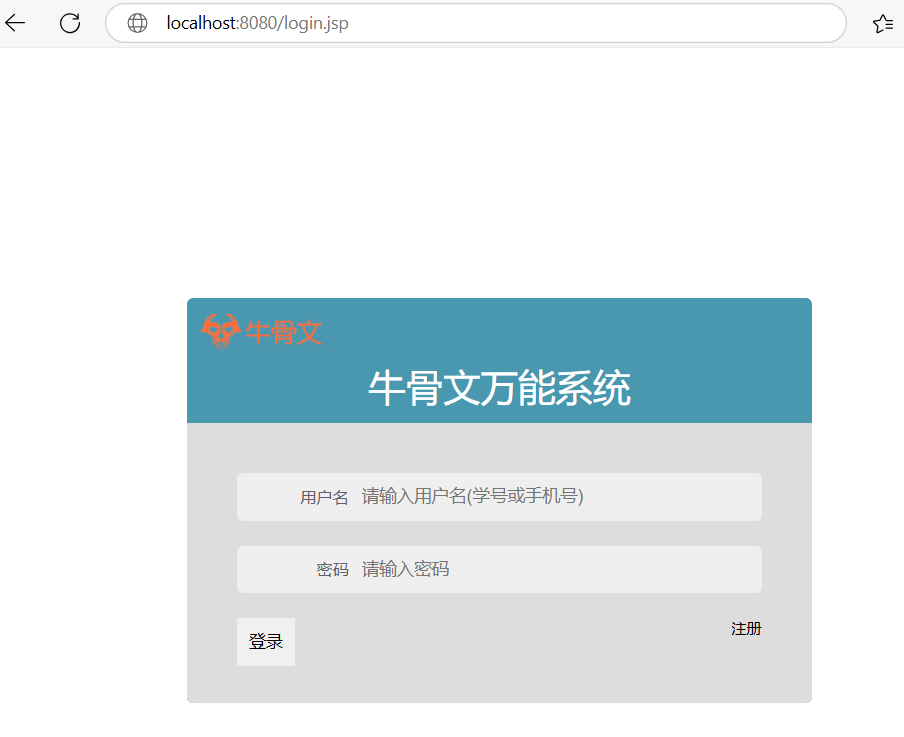
最终效果
文件放在网站根目录/login.jsp,最终访问效果如下
- 上一篇:没有了
- 下一篇:新建checklogin.jsp
- 文章导航